

Event Simulator
The Event Simulator follows a publisher tracking link in a real browser and checks every step of tracking: the redirect chain, the Integr8 click, the transaction ID handed to the landing page, a test conversion, and the postbacks it fires. Use it to confirm a new publisher or offer setup before real traffic arrives.
When to use the Event Simulator
Section titled “When to use the Event Simulator”- Verifying a new publisher tracking link before the publisher starts sending traffic
- Checking that the Integr8 transaction ID reaches the advertiser landing page through every redirect
- Confirming that publisher postbacks fire for a conversion on that link
- Finding the exact step where a broken tracking setup stops
To watch the uptime of landing pages over time, use Link Monitoring instead.
Before you begin
Section titled “Before you begin”- Get the publisher tracking link to test. It can be your Integr8 tracking link or a publisher or affiliate link that redirects to it. See Tracking links.
- Make sure a Global Secure Code exists for your integration. The simulator uses it to send the test conversion. See Global tracking settings.
- Set up the publisher postbacks you want to verify. Without a matching postback, the postback stage is skipped.
- You need edit access to the integration to start a simulation. Partner users cannot open the Event Simulator.
How to access it
Section titled “How to access it”In the sidebar under TOOLS, open Event Simulator.
What a simulation does
Section titled “What a simulation does”A simulation is a real test, not a preview:
- The click is recorded on your integration as a test click. Any
sub_idon the Integr8 click is replaced byTestLink. - The test conversion is real, with zero revenue and payout. It appears in your reports.
- Matched postbacks are really sent to the publisher. Postback delays are skipped.
Run a simulation
Section titled “Run a simulation”- Go to TOOLS > Event Simulator.
- Paste the link in Publisher Tracking Link. It must be an
httporhttpsURL of at most 2048 characters. Usehttps: anhttplink on your Integr8 domain fails the click check. - Pick a Device: Windows, Mac, iOS, Android, My User Agent, or Custom. With Custom, enter the user agent string.
- Optionally pick a Country (optional). The link then opens through a residential proxy in that country. Without a country, the link opens from the test server’s IP address.
- Click Start Simulation. The simulation details page opens and shows live progress.
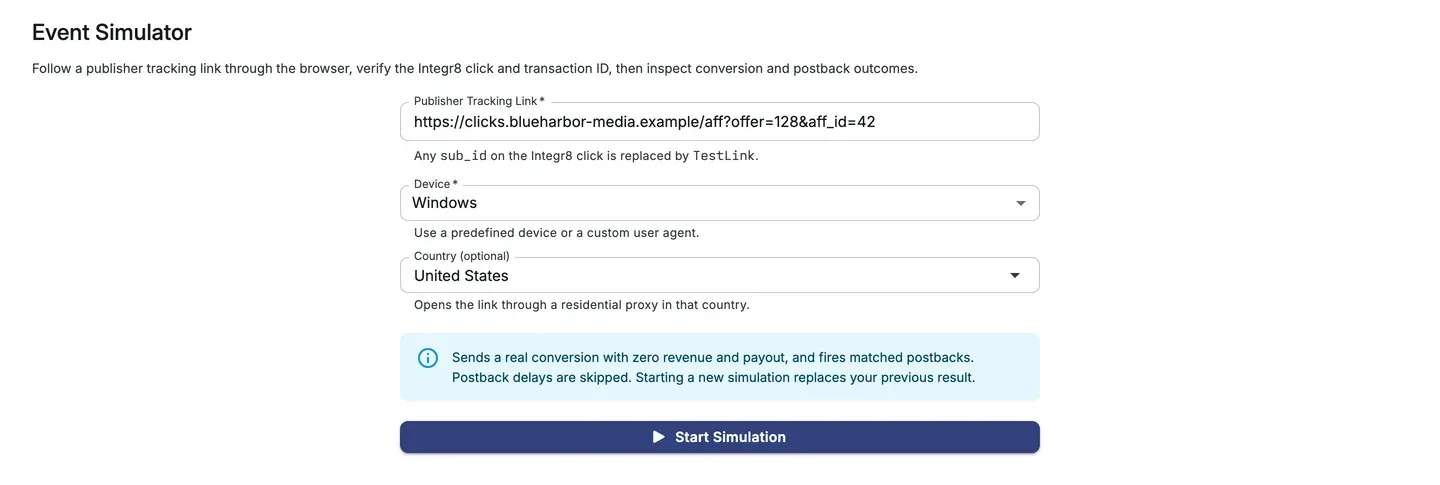
You can run one simulation at a time. If yours is still running, the setup page shows A test is already running with a View Progress button, and Start Simulation stays disabled until it finishes. Starting a new simulation replaces your previous result.
Simulation stages
Section titled “Simulation stages”The details page lists the stages in order. Each stage starts only after the previous one passes.
| Stage | What it checks |
|---|---|
| Simulate browser click | Opens the publisher tracking link with the selected device and country, then inspects the redirect chain |
| Check Integr8 click is recorded | Confirms that your integration recorded the test click, then finds the Integr8 transaction ID in the redirect chain and checks that it reaches the final landing URL |
| Simulate Integr8 attribution | Sends a test conversion for the verified transaction ID |
| Verify post-attribution postback is fired | Checks that the publisher postbacks for the test conversion were delivered |
Each stage shows one of these statuses: Not run, Waiting, Checking, Passed, Failed, Skipped, or Inconclusive. When a stage fails, the later stages are Skipped.
The simulator waits up to 2 minutes for the click to appear, 5 minutes for the conversion to be recorded, and 3 minutes for postbacks to be delivered.
Read the results
Section titled “Read the results”The header shows the device, the country, and the offer and publisher the click was recorded for. Click the offer or publisher to open it in a new tab.
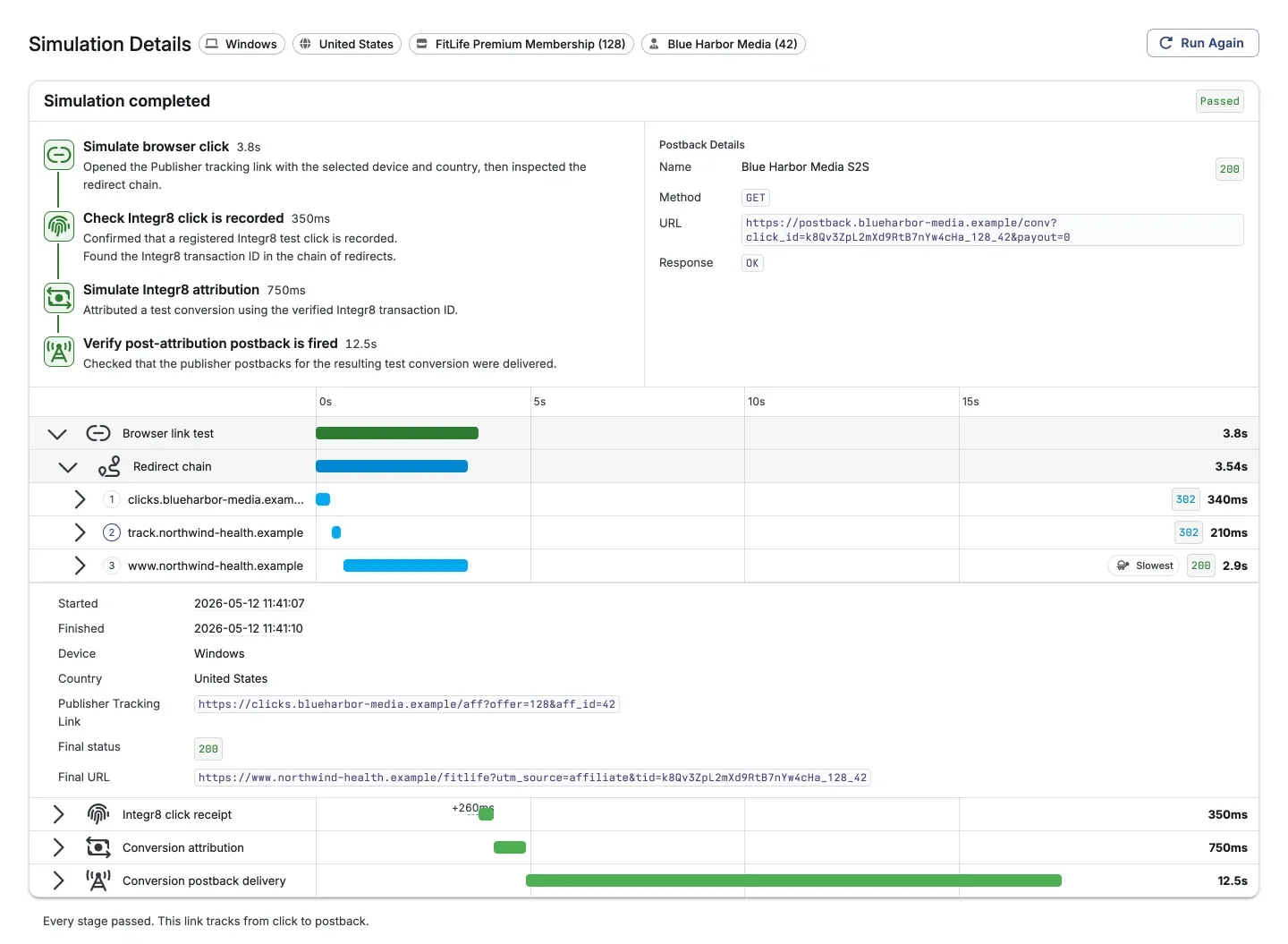
- Postback Details, next to the stages, lists every postback that matched the test conversion with its name, delivery status, method, URL, request, and response.
- The run timeline, below the stages, appears once the simulation finishes. It shows how long each stage and each redirect took. Open a row to see its details, such as the redirect URL, status code, latency, and whether the hop carried the transaction ID.
- Report links in the timeline open the matching records: View Click data for the test click, View Event data for the test conversion, and View Postback logs for the deliveries.
- A one-line summary below the timeline explains the result.
Click Run Again to open the setup form filled in with the same link, device, and country.
Results are kept for 1 hour after a simulation finishes. After that, or after you start a new simulation, the details page shows This simulation is no longer available.
When a simulation fails
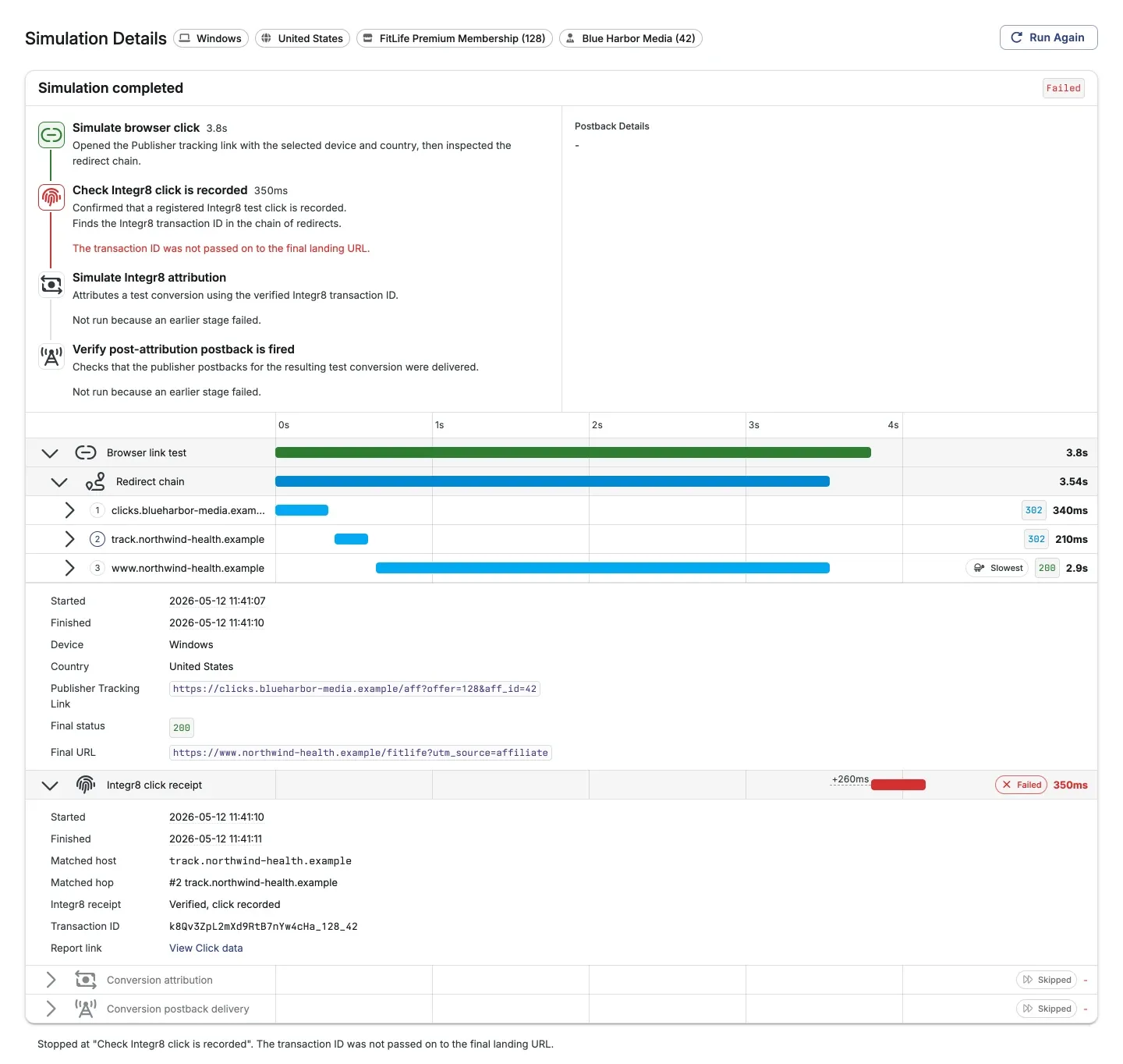
Section titled “When a simulation fails”The failed stage shows the reason, and the summary below the timeline repeats it.
| Reason shown | What to check |
|---|---|
| The redirect chain never reached an Integr8 endpoint. | The link does not lead to your Integr8 tracking link. Check each redirect in the timeline |
| The chain recorded clicks only on other Integr8 integrations, so your integration never received the test click. | The link leads to another Integr8 integration. Check that it leads to your tracking link |
| The chain reached Integr8, but no click was recorded. | The link reaches Integr8 on a route that does not record clicks, such as a Smart Link |
| The transaction ID was not passed on to the final landing URL. | Add {transaction_id} to the offer’s Redirect URL. See Conversion tracking |
| The transaction ID appeared on an intermediate redirect but not on the final landing URL. | A redirect after Integr8 drops the parameter. Check the redirects in the timeline |
| This integration has no conversion secure code set up, so a test conversion could not be created. | Set up the Global Secure Code in Global tracking settings |
| The test click is not visible yet. It may still be in transit, so it might show up shortly. | Wait a moment and run the simulation again |
| No postback managers matched this conversion, so there was nothing to deliver. | The postback stage is skipped. Create a postback for the publisher. See Affiliate postback setup |
| A postback delivery failed. | Open Postback Details to see the response, then check the postback URL |
| The proxy for the selected country failed. | Try again, or run the test without a country |
A stage marked Inconclusive could not reach a verdict, for example when the conversion was not recorded in time. Its conversion and postbacks may still arrive later. Check Postback logs or run the simulation again.