

· 9 min read
What Is a Postback URL? How S2S Conversion Tracking Works
On this page
- What is a postback URL?
- How does a postback work?
- Inbound vs outbound postbacks
- Postback URL parameters and macros
- S2S postback vs postback pixel vs clickless
- How do you secure a postback URL?
- Events and rejected conversions
- How to test and debug a postback URL
- Setting up postback URL tracking
- Postback URL FAQ
- Is a postback URL the same as a tracking pixel?
- What is a click ID in a postback?
- Do postbacks need cookies?
- Why are my conversions counted twice?
- Does Integr8 retry a failed postback?
A postback URL is a server-to-server callback that tells a tracking platform a conversion happened. The click gets a unique ID, the advertiser stores it, and when the user converts, the advertiser's server calls the postback URL with that ID. The tracker matches it to the original click by ID, so S2S attribution does not need browser cookies.
That is the short answer. The longer one is worth knowing, because when tracking looks broken, the cause is often the postback: it fired with the wrong macro, fired twice, or never fired at all. Below is how postback URL tracking works in both directions, what belongs in the URL, and how to debug one that fails.
What is a postback URL?#
A postback (also called an S2S postback, for server to server) is an HTTP request one system sends to another when something happens. In performance marketing, that something is usually a conversion: a lead, a sale, an install, a deposit.
The URL is the address the request goes to, plus parameters that describe the conversion. The one parameter that always has to be there is the click ID, because it is how the receiving side knows which click earned the conversion.
Pixels used to do this job from the browser. That got harder every year as browsers restricted cookies and cross-site tracking. Safari's Intelligent Tracking Prevention, for example, blocks third-party cookies by default and caps the lifetime of some first-party cookies (WebKit).
A postback avoids that problem. The postback itself is a call between two servers, so browser cookie rules do not affect it.
How does a postback work?#
Every postback is a round trip of one ID. Here is the flow in Integr8, step by step:
- A visitor clicks a publisher's tracking link. Integr8 logs the click and gives it a unique
transaction_id. - Integr8 redirects the visitor to the offer's landing page and inserts the click ID into the URL, for example
https://example.com/lp?clickid={transaction_id}. - The advertiser's system stores that click ID with the visitor's session.
- The visitor converts. The advertiser's server calls Integr8's postback URL and passes the same click ID back.
- Integr8 matches the ID to the original click and records the conversion against the right offer and publisher.
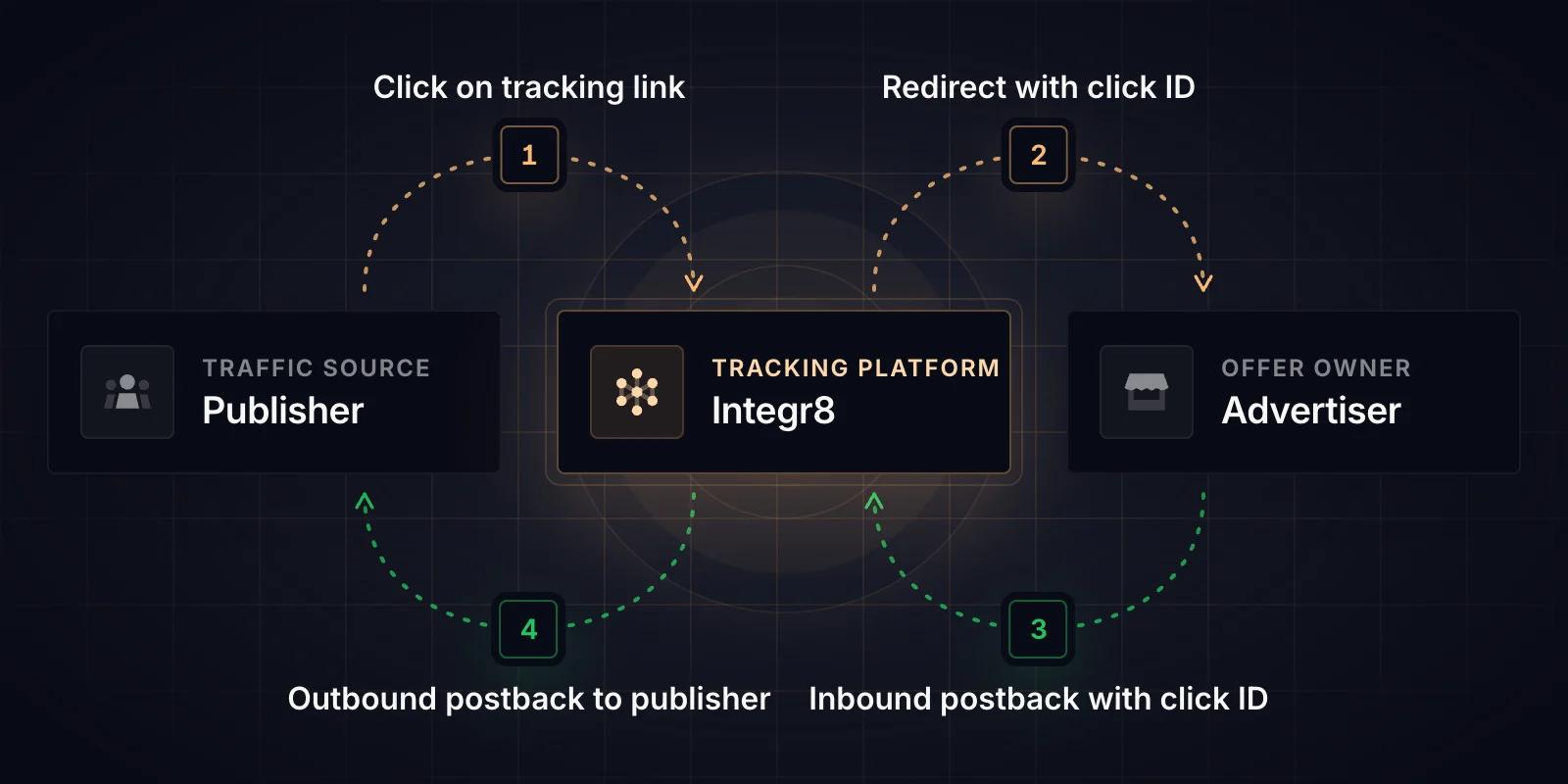
Step 2 is the easiest place for a setup to break without anyone noticing. If the offer's redirect URL does not contain {transaction_id}, the advertiser never receives a click ID, and there is nothing to send back. Conversions happen, but they cannot be attributed to a click.
Inbound vs outbound postbacks#
Most explanations stop at the advertiser-to-tracker step. In a network there are two postbacks per conversion, going in opposite directions.
Inbound (advertiser to tracker). The advertiser tells your tracking platform a conversion happened. A typical inbound postback URL looks like this:
https://track.yourdomain.com/api/event-tx?secure=YOUR_TOKEN&transaction_id=REPLACEThe advertiser swaps REPLACE for whatever placeholder their own system uses for the stored click ID. In practice, copy this URL from your platform's generator rather than typing it. In Integr8 that is Offers > Global Tracking > Conversion Global Postback for an account-wide URL, or, for a single offer, the offer's Revenue & Payout tab (webhook icon on the Conversion row, then Postbacks).
One rule saves a lot of cleanup: do not mix a global and an offer-level inbound postback for the same integration. It causes duplicate conversions.
Outbound (tracker to publisher). Once the conversion is recorded, your platform tells the publisher, so their own tracker can credit the right campaign. The publisher gives you their URL, and you add macros:
https://publisher-track.com/postback?clickid={external_transaction_id}&status={status}&payout={payout}{external_transaction_id} is the publisher's own click ID, which they passed into your tracking link. Without it, the publisher receives a conversion they cannot match to anything.
Postback URL parameters and macros#
A macro is a placeholder in curly braces that the platform replaces with a real value when the postback fires. Names differ between platforms, which is exactly why copied postback URLs break. These are the core outbound macros Integr8 fills:
| Macro | What it sends |
|---|---|
{transaction_id} |
Integr8's unique click ID |
{external_transaction_id} |
The publisher's click ID from the tracking link |
{offer} |
Offer ID |
{offer_name} |
Offer name |
{publisher} |
Publisher ID |
{sub_id} |
Sub-publisher ID ({sub_id_2} to {sub_id_6} also exist) |
{payout} |
Publisher payout |
{revenue} |
Advertiser revenue |
{status} |
Conversion status |
{rejection_reason} |
Reason code when a conversion is rejected |
Beyond the core set there are macros for events ({event_id}, {event_name}), device and geo data ({geo_country}, {os}, {device_id}) and timing ({click_time}, {unix_time}). In Integr8 you pick them from Add Macros to URL instead of typing them, which avoids typos. Before you hand a URL to anyone, check that every macro in it appears in your platform's macro list, character for character.
S2S postback vs postback pixel vs clickless#
There are three ways to report a conversion inbound. Pick the first one that works for your advertiser.
S2S postback. The advertiser's server sends a GET request with the click ID. It is the most reliable method and should be the default. Nothing on the user's device can block it.
Postback pixel. A 1x1 image tag on the advertiser's thank-you page. Use it only when the advertiser cannot send server calls but controls the thank-you page HTML. It runs in the browser, so ad blockers can stop it, and in Integr8 it requires a custom tracking domain because it reads a cookie set on the tracking link's root domain.
Clickless postback. For conversions with no click at all, such as a direct app install attributed by device ID. You give up click-level attribution, so use it only when there is genuinely no click to match.
How do you secure a postback URL?#
An inbound postback URL is an open door: anyone who has it can create conversions. Two settings close it.
- Secure token. Integr8 postback URLs carry a
secureparameter that authorizes the request. The token belongs in postback URLs only. Never put it in a link you give to publishers, and renew it if it leaks. - Known server IPs. With Only Allow Event from known Server IPs turned on for an advertiser, conversions and events are accepted only from known platform IPs or server IPs you approve.
Events and rejected conversions#
Conversions are rarely the end of the story. A free trial turns into a paid plan, an install turns into an in-app purchase.
Events use the same postback mechanism, plus an event_id or event_name parameter. One rule to know: an event postback needs a parent conversion. If the conversion postback never arrived, the event will not fire either.
Rejections go the other way. When a conversion turns out to be fraud or a chargeback, the advertiser can call a rejection URL with the transaction_id and a new_rejected_reason. The conversion flips to rejected. There is no undo, so advertisers should only automate this for reasons they are sure about.
On the outbound side, the Firing Status setting decides what publishers hear about. Approved only is the sensible default. You can also add a firing delay (minimum two minutes) so a fraud check finishes before the publisher is told a conversion counted.
How to test and debug a postback URL#
Test before you go live. In Integr8, a Test link from the tracking link generator creates a test conversion path you can run end to end. Note that it skips targeting, caps, fraud filters and throttling, and calculates no revenue or payout, so it proves the plumbing, not the rules.
When a postback fails, work through it in this order:
- Was the click ID passed to the advertiser? Check the offer's redirect URL for
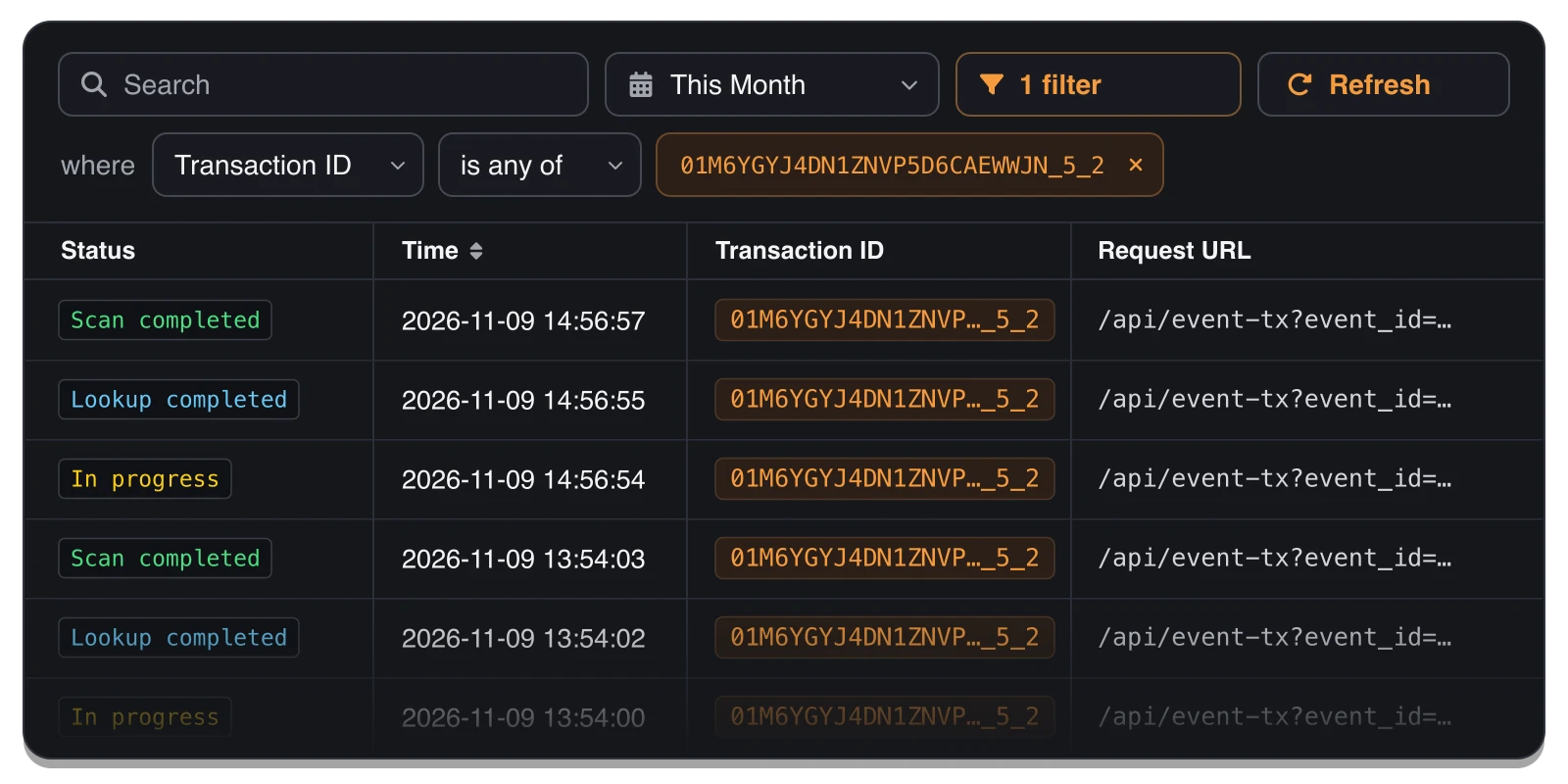
{transaction_id}. - Did the inbound postback arrive? Server Logs show every request Integr8 received, including rejected ones, with the full URL and any parsing error. Filter by Transaction ID.
- Did the outbound postback fire? Postbacks > Postbacks Logs show every postback Integr8 tried to send, with the URL called, the response code and the publisher server's response.
- Read the response code. A
4xxmeans the publisher's server rejected the request, usually a wrong parameter. A5xxmeans their server errored (MDN: HTTP response status codes). A0or timeout means it was unreachable. - Re-fire after the fix. Integr8 does not retry failed postbacks automatically. Once the cause is fixed, ask the advertiser to re-fire the original conversion postback.
Filtering Server Logs by one Transaction ID shows every request Integr8 received for that click and how far each one got. In this example, two event postbacks arrived for the same transaction, and each moved from In progress to Lookup completed to Scan completed within a few seconds. If a postback you expect is missing from this list, it never reached Integr8. If one stops with an error, the log shows the reason.
Start with steps 1 and 4: a missing click ID or a mistyped macro is the usual suspect. Rule those two out before you look for anything more unusual.
Setting up postback URL tracking#
A postback URL is simple on paper: one ID goes out with the click and comes back with the conversion. In a real network it is two postbacks in two directions, a security token, a macro list that has to match exactly, and logs you check before a publisher emails you about missing conversions.
If you want the background on why server-side tracking replaced browser pixels in the first place, read what server-side conversion tracking is and how it works. For setup in Integr8, the step-by-step guides cover conversion tracking, affiliate postback setup and postback logs. Check our documentation and you can have your first postback firing in a test run today.
Postback URL FAQ#
Is a postback URL the same as a tracking pixel?
No. A postback is a call from the advertiser's server to the tracker's server. A pixel is an image tag that loads in the visitor's browser, so ad blockers and browser privacy rules can stop it. Use a pixel only when the advertiser cannot send server calls.
What is a click ID in a postback?
It is the unique ID the tracker gives each click. In Integr8 it is the transaction_id. It goes to the advertiser with the redirect and comes back in the postback, which is how the conversion is matched to the right click, offer and publisher.
Do postbacks need cookies?
An S2S postback does not. It matches the conversion by click ID, so browser cookie rules do not affect it. The postback pixel is different: in Integr8 it reads a cookie on your tracking domain, which is why it needs a custom tracking domain.
Why are my conversions counted twice?
The most common cause is a global and an offer-level inbound postback set up for the same integration, so both fire. Use one or the other for each advertiser integration.
Does Integr8 retry a failed postback?
No. Failed outbound postbacks are not retried automatically. Check Postbacks Logs for the response code, fix the cause, then ask the advertiser to re-fire the original conversion postback.


